How to create new developer users in Mini SAP

The SAP Netweaver Trial Version, also known as Mini SAP, only has one single development user BCUSER after initial installation. Although you can create new users and even equip them with development authorisations, every attempt to perform actual development tasks with them will fail because they lack a valid developer key. This article will show you how to disable this check routine for developer keys, so that any user with all necessary authorisations can also create and edit objects in the customer namespaces.
Instructions step by step
Before you begin with the operation please remember to perform this only in your sandbox system. Athough the same steps can be performed in customer systems with the same result, I strongly discourage you to implement it. Don't even think about it. Okay, enough warnings, lets get started with
- Signing on BCUSER and going to transaction SE38, where you go to include LSKEYF00.
- In the include, choose the button that looks like a snail Enhance (Shift + F4).
- Go to menu Edit, Enhancement Operations, Show Implicit Enhancement Options.
- Now, all implicit enhancement points of the include will be shown. Those are the spots where it's possible to insert your own coding. Look out for the enhancement point Form CHECK_KEY, End, and place the cursor in the same line. Then go back to the menu, and choose Create Implementation.
- You will be asked for the type of the enhancement. Choose Code here.
- Afterwards, you will be asked for a name and a description for your new implementation. Enter anything you want within the customer namespace.
- We're almost done with the operation already. You can now enter your own coding into the enhancement point. Just enter a single line: sy-subrc = 0.
- As a final step, click on the button Activate Enhancements (Ctrl + F3). Once this step is performed, you will still be asked for a developer key when one of your users creates or edits their first object. However, you can just enter any random number, and the user will receive unlimited development authorisations.
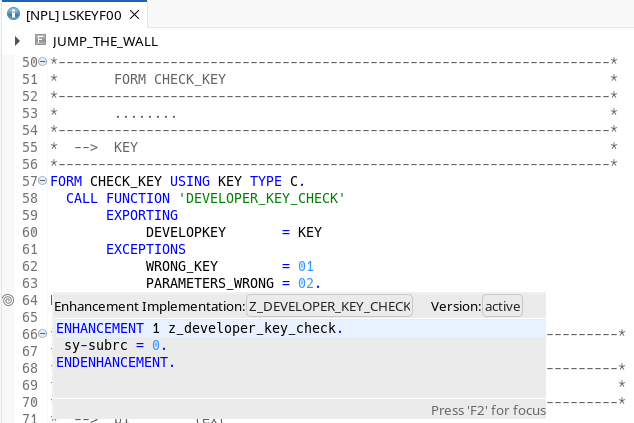
One step further: Remove the access key check for objects in SAP namespace
If you perform the same operation in the enhancement point Form ADIR_CHECK, End in the same include, and add the same line as above, you can remove the access key that is necessary to create or edit any objects in the SAP namespace. Once you've done that, whenever you're prompted for an access key, just enter any random number, and
you'll get access to the requested object.


